Check a member's dues and payment status
As a Business Agent, I want to look up a member and confirm whether they're paid up and in good standing, so that I can answer their question (or an employer's) on the spot without escalating.
Screen: Members > search, then Demographics / DuesHistory / StatusType / Buckets tabs.
Steps
- Search Members by name (
Last, First) or Reg#. A single match auto-opens the record. -
Read the static header bar at the top of the record — it shows Status, Type (Active/ Inactive), PTD (Paid Through Date), Employer, JobSite, Balance Due, and Hourly Rate/Dues Rate. This is the fastest way to answer "are they current" without opening a tab.

-
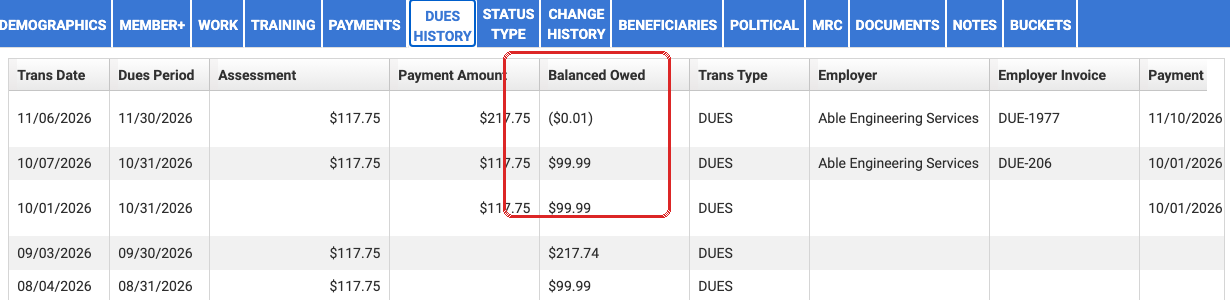
For transaction-level detail, open DuesHistory — a ledger of Trans Date, Dues Period, Assessment, Payment Amount, Balance Owed, Trans Type (Dues, Fed PAC), Employer, and Employer Invoice, one row per transaction.
- Open Buckets if the member mentions a credit or hold — it lists open financial transactions with a "Show Open Transactions Only" filter; an empty grid with "$0.00" total means there's nothing outstanding, not a loading failure.
- Open StatusType to confirm current standing history (effective-dated Status and Member Type rows) if the header bar's Status looks surprising for the conversation you're having.
Use the static header bar's Balance Due as the source of truth, not a DuesHistory row
DuesHistory's grid shows a running Balanced Owed column per transaction row — it's easy to read the wrong row (especially mid-scroll on a long ledger) and quote a stale balance. The header bar's Balance Due field is always the member's current total; use it to sanity-check any number you're about to read off a grid row before repeating it to a member.
Things to watch out for
Name search is a prefix match, not exact or fuzzy
Searching matches on the first few letters of last name + first few letters of first name — not exact equality, not substring anywhere in the name. A short name you type can prefix-match a longer real one and auto-open the wrong person with no "not found" warning. If you need to be certain you have the right member (not just someone matching), check the opened record's own name badge — or search by Reg# instead whenever you have it.
Avoid fixture rows marked for testing
Any row starting with "DO NOT USE" or "Missing" is a deliberately-poisoned test fixture, not a real member — this applies in UAT, not production, but is worth knowing if you're ever walking through this process in a training/practice environment.
A member's displayed Business Agent comes from the jobsite's Primary contact flag
The static header bar's BA field is sourced from whichever union contact on that jobsite is flagged Primary — not from an assignment tied to the member directly. If a member works multiple jobs, or a jobsite has more than one BA listed as a contact, only the one flagged Primary surfaces here. A "wrong BA" complaint is almost always a data/config fix (set the correct contact's Type to Primary on that jobsite), not a Prizm display bug. (IUOE-2112)
Dues rate/eligibility follows the active Work Record's Trade Code, not Member Type
If a member's dues rate or invoice-eligibility looks wrong, don't troubleshoot by looking at Member Type — dues suppression and rate are driven entirely by the current Work Record's Trade Code (e.g. the DIS code for a disabled member). Changing Member Type alone does nothing; the correct path is closing the work record and adding the right trade-code work record, which then updates Member Type automatically. (IUOE-2596)
Some tabs you'd expect aren't there, on purpose
Phone Payment, Dependents, Beneficiaries, BenefitsHistory, H&W History, and HRA History are either role-gated away from Business Agent or fund-gated to H&W Staff specifically — their absence on a member record isn't a bug. If a member needs one of those handled, see Know when to hand off to Accounting.